How to find mosques with a women’s prayer space
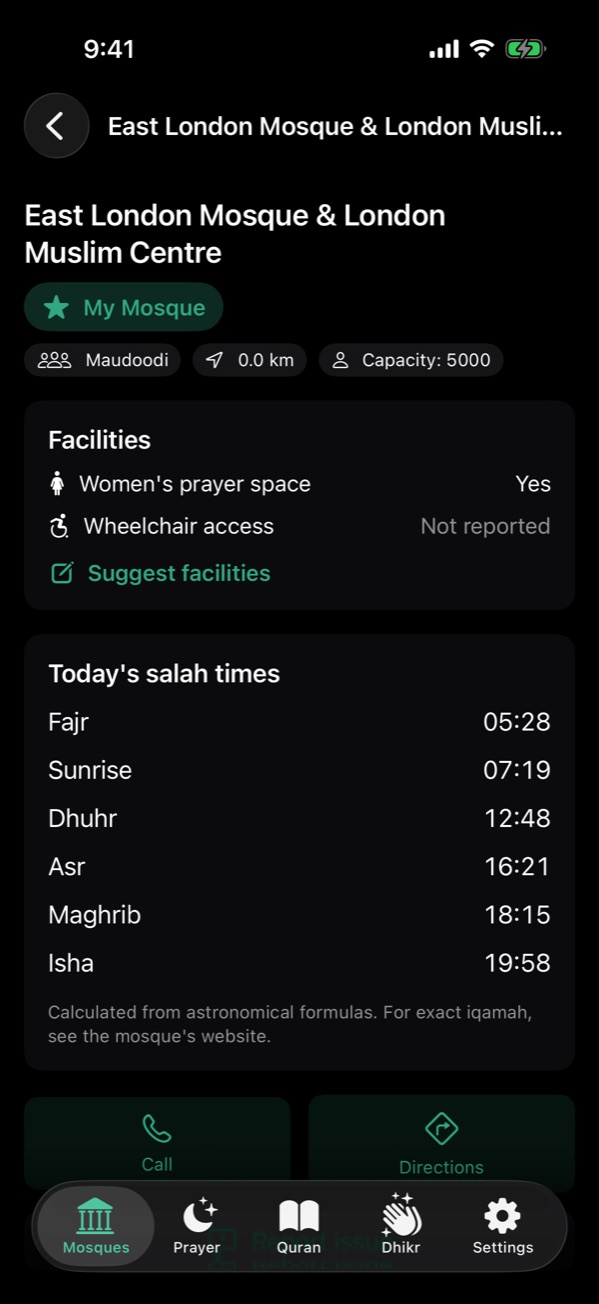
In NearMasjid, open the filter on the Mosques tab and turn on Women’s prayer space. The map and list then show only mosques where a women’s area is known. Each mosque’s page says Yes, No or Not reported, and you can tap Suggest facilities to help fill gaps.
Filter the map
- Open NearMasjid and go to the Mosques tab.
- Tap the filter button.
- Turn on Women’s prayer space.
Only mosques with a known women’s area stay on the map and list.
Check a mosque’s details
Tap any mosque to see its Facilities section: women’s prayer space and wheelchair access, each marked Yes, No or Not reported.
Help other sisters
If you know a mosque well, tap Suggest facilities. Your suggestion is checked before it is published, so the information stays reliable.
Travelling with family
On a long drive, Plan Route lists every mosque along the way; tap each to see which have a women’s area before you stop.
Know before you go
NearMasjid shows women’s prayer space and wheelchair access for each mosque where known, with filters for both.
Download on the App StoreFree for iPhone and iPad. No ads, no account, no in-app purchases.
Frequently asked questions
What does “Not reported” mean?
Nobody has confirmed the facility yet. NearMasjid shows Not reported instead of guessing, so treat it as unknown and check with the mosque.
How can I add this information?
Open the mosque and tap Suggest facilities. Suggestions are reviewed before they appear for everyone.