
How to find Jumu’ah prayer while travelling
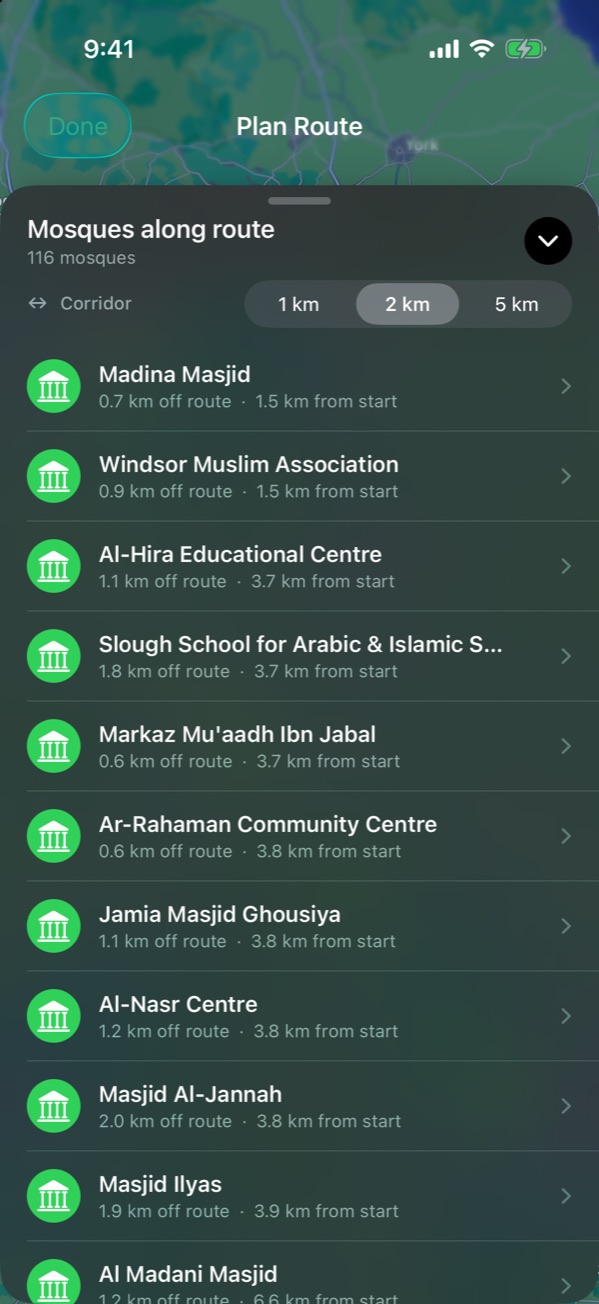
Search the town you’ll be in on Friday in NearMasjid, or use Plan Route to list every mosque along your drive. Tap a mosque to check its details, and contact the mosque directly to confirm its Jumu’ah time, as many hold more than one jama’ah.
If you know where you’ll be
Open NearMasjid, type the town or postcode in the search field, and switch to List to see its mosques by distance. Larger mosques are often easier for visitors, and many list their Jumu’ah times on their website.
If you’ll be driving
Use Plan Route to see every mosque along the journey before you set off. Pick the one you’ll reach around midday and check its details. See how to find mosques along your route.
Confirm the time
Many mosques hold two or more Jumu’ah congregations, especially in summer. A mosque’s website, notice board or phone line is the best way to confirm the khutbah time on the day.
Find a masjid wherever Friday finds you
Search any town or list every mosque on your route with NearMasjid, then open directions in one tap.
Download on the App StoreFree for iPhone and iPad. No ads, no account, no in-app purchases.
Frequently asked questions
Does NearMasjid show Jumu’ah times?
NearMasjid shows each mosque’s location, facilities and calculated prayer times. Jumu’ah times are set by each mosque and often change with the seasons, so check the mosque’s website or call ahead.
What if there’s no mosque on my route?
Widen the Plan Route corridor to 5 km, or search the nearest larger town. NearMasjid also searches Apple Maps to fill gaps in the mosque data.