
Read the Kanzul Iman translation on iPhone
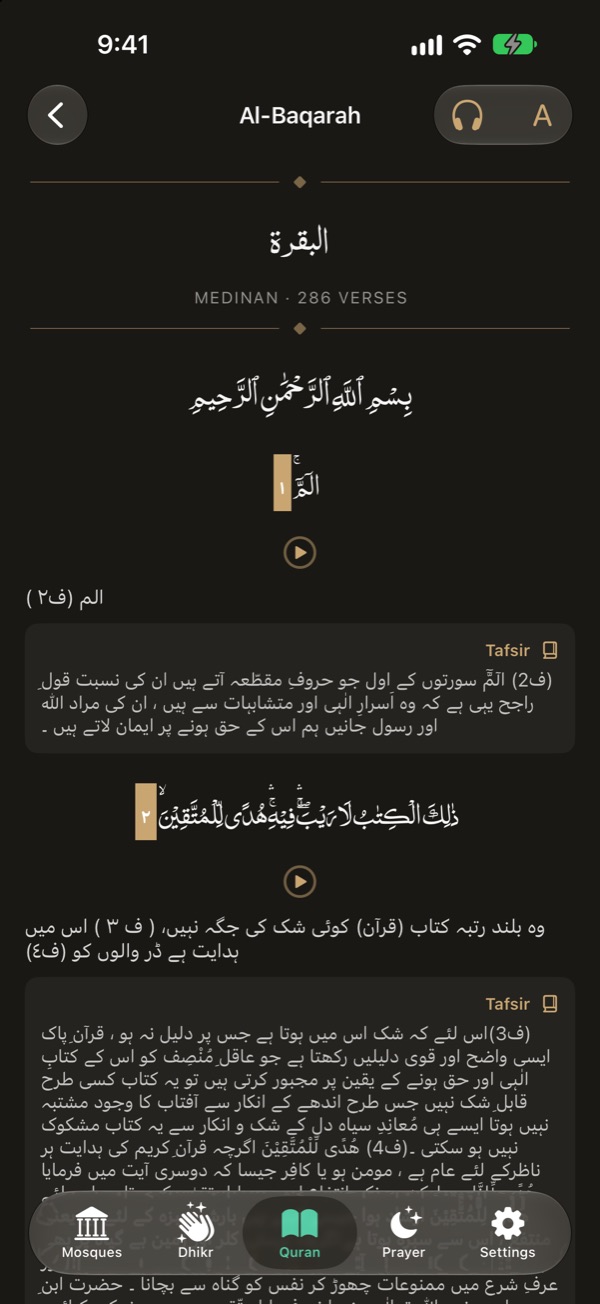
In NearMasjid, open any surah, tap reader settings, set Reading mode to Continuous, turn on Show translation and pick Urdu, English or Roman. The translation is Kanzul Iman, shown under each ayah, and works offline.
Turn it on
- Open the Quran tab and choose a surah.
- Tap reader settings.
- Set Reading mode to Continuous.
- Turn on Show translation and choose the Language: Urdu, English or Roman.
Add the tafsir
With Urdu selected, turn on Show tafsir to see the Khazain-ul-Irfan note under ayahs that have one. See Khazain-ul-Irfan tafsir.
Listen as you read
Tap the headphones to play the recitation. You can download surahs for offline listening.
Kanzul Iman, under every ayah
Read Kanzul Iman in Urdu, English or Roman Urdu, with Khazain-ul-Irfan tafsir notes in Urdu. Free, no ads.
Download on the App StoreFree for iPhone and iPad. No ads, no account, no in-app purchases.
Frequently asked questions
Who wrote Kanzul Iman?
Kanzul Iman is the Urdu translation of the Quran by Imam Ahmad Raza Khan.
Does it need the internet?
No. The translation is installed with the app.
Why can’t I see the translation on the mushaf pages?
Mushaf pages reproduce the printed copy. Switch Reading mode to Continuous to see translation and tafsir.